
How to show clients where their commission is — without sharing your whole board
August 14, 2026 · Art Commission Desk· Checked August 14, 2026
The reason clients send "any update?" messages is almost never impatience. It is that from where they are standing, nothing has happened since they paid. Something has — you did the sketch on Tuesday — but there is no place they can go to see it.
The obvious fix is to show them the board you already keep. That runs into a wall in every common tool, and it is the same wall each time: sharing is a property of the board, not of the client. So you can show one client everything, including the other clients, or you can show them nothing.
What happens when people try it anyway
They make a second board. One private board that is the real one, and one public board with the sensitive parts left out. It is such a common workaround that we found artists describing it as ordinary practice — and it fails in an ordinary way. The public copy is updated when you remember, which is not every time, and the client who is checking it is looking at the version that is a week behind. You now maintain two boards and the one clients see is the one that lies.
The second thing that goes wrong is stranger. On a free Trello board, "read-only" is the paid tier — so a board that is public enough for clients to see is also a board that visitors can edit. This is a real worry, not a theoretical one; here is someone on r/artbusiness explaining what they were trying to prevent:
I'm really just trying to make it so someone can't go into the board and move stuff around and write something offensive everywhere
The third failure is the one people stop noticing because it is everywhere: the update lives in a DM. A sketch gets sent in Discord, approval comes back in Twitter replies, the deadline was agreed in an email in March. Nothing is wrong with any single message — the problem is that six weeks later neither of you can find the thing that was agreed, and the only record of the work is a scroll-back. Artists routinely run a form, a board, a payment link and a chat app that know nothing about each other; the client's picture of the job is assembled from whichever of those they happened to see.
And the fourth: even when clients can see the board, they often cannot read it. A commission board is written for you — abbreviations, stage names that mean something inside your process, six other people's jobs in the way. Handing that to a client is not the same as telling them where their piece is.
What a client-facing progress page actually needs
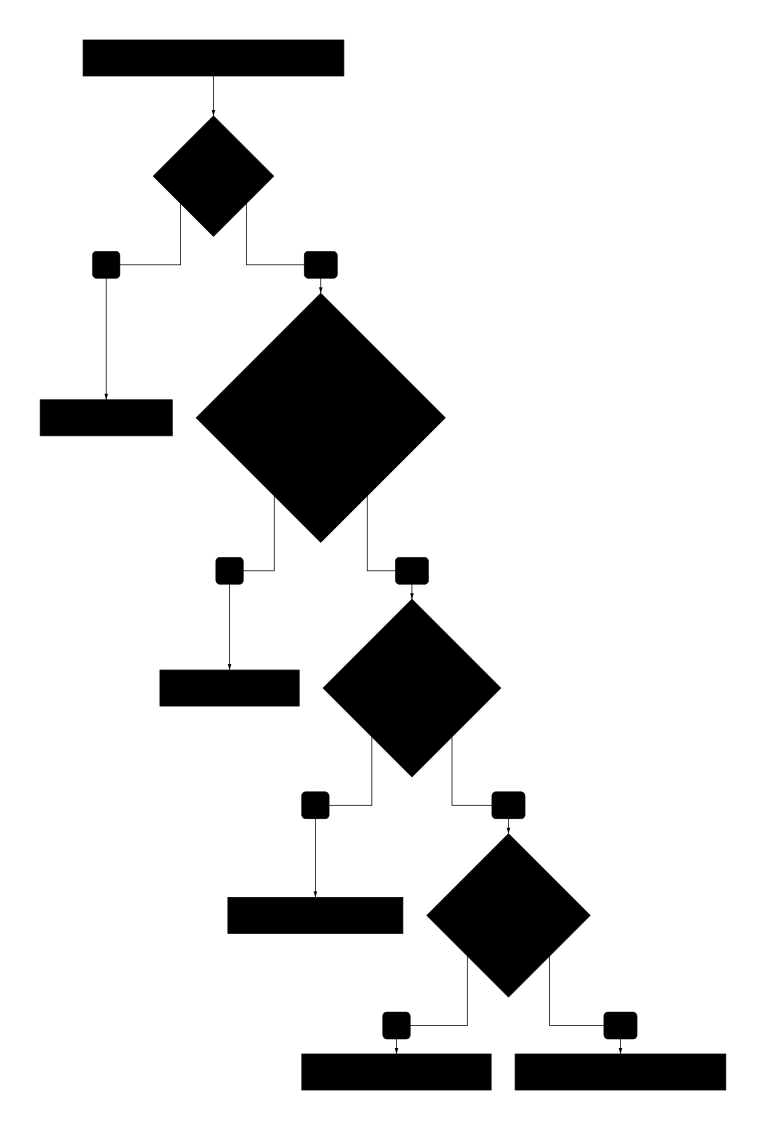
Four gates, checkable in order, most tools fail the second one:
- Per-client scope. This client sees this commission. Not a filtered view of everything — a page that only ever contained one job.
- No login. A client who has to make an account to see their sketch will not do it.
- Read-only by construction. Not read-only by permission setting — nothing on the page to click.
- Updated as a side effect of your work. A stale progress page is worse than none; it actively misinforms.
There is a fifth thing outside that chain: it should be legible to someone who does not know how you work — stage names a stranger understands, a sense of where their piece sits in line, and dates. This is the difference between a tool you shared and a page you sent.
How the common options measure up
Trello / Notion, second board. Fails 1 and 4. The scope problem is the whole reason the second board exists, and manual updating is why it goes stale.
Trello Premium with observers. Fixes 3. Does not fix 1: an observer sees the entire board, every client on it.
A Google Sheet shared read-only. Free, genuinely read-only, and it satisfies 2 and 3 cleanly. Fails 1 in the most dangerous way available — the sharing is per file, and a link shared once is shared for good. It also fails 5 badly: a spreadsheet is the least reassuring thing you can send someone who is waiting on art. (If you go this way anyway, our Google Sheets tracker guide covers giving each client only their own row.)
A per-client Notion page. This does work, and some artists run it well. It fails 4: every update is a page you have to remember to edit, times however many clients are open.
Marketplace order pages (VGen, Artistree). Structurally correct, and the only option here that gets all four right at once: the client sees their own order and nothing else, needs no separate account, has nothing to click, and the page moves when you move the work. That is the shape to copy. The catch is that it only covers commissions taken through that platform, and marketplaces take a cut and sometimes gate access. Work that reaches you through Twitter or Discord DMs is not on it — which for most artists is most of it.
Side by side
| One client, one page | No login | Nothing to click | Updates itself | |
|---|---|---|---|---|
| Second public board | No | Yes | No, on free tiers | No |
| Trello Premium observer | No — whole board | Account needed | Yes | Yes |
| Shared read-only sheet | No — whole file | Yes | Yes | Yes |
| Per-client Notion page | Yes | Yes | Yes | No |
| Marketplace order page | Yes | Yes | Yes | Yes, on-platform only |
The pattern in that table is the argument for building this differently: every option that gets scope right loses on updating, and every option that updates itself shows too much.
Where we come in
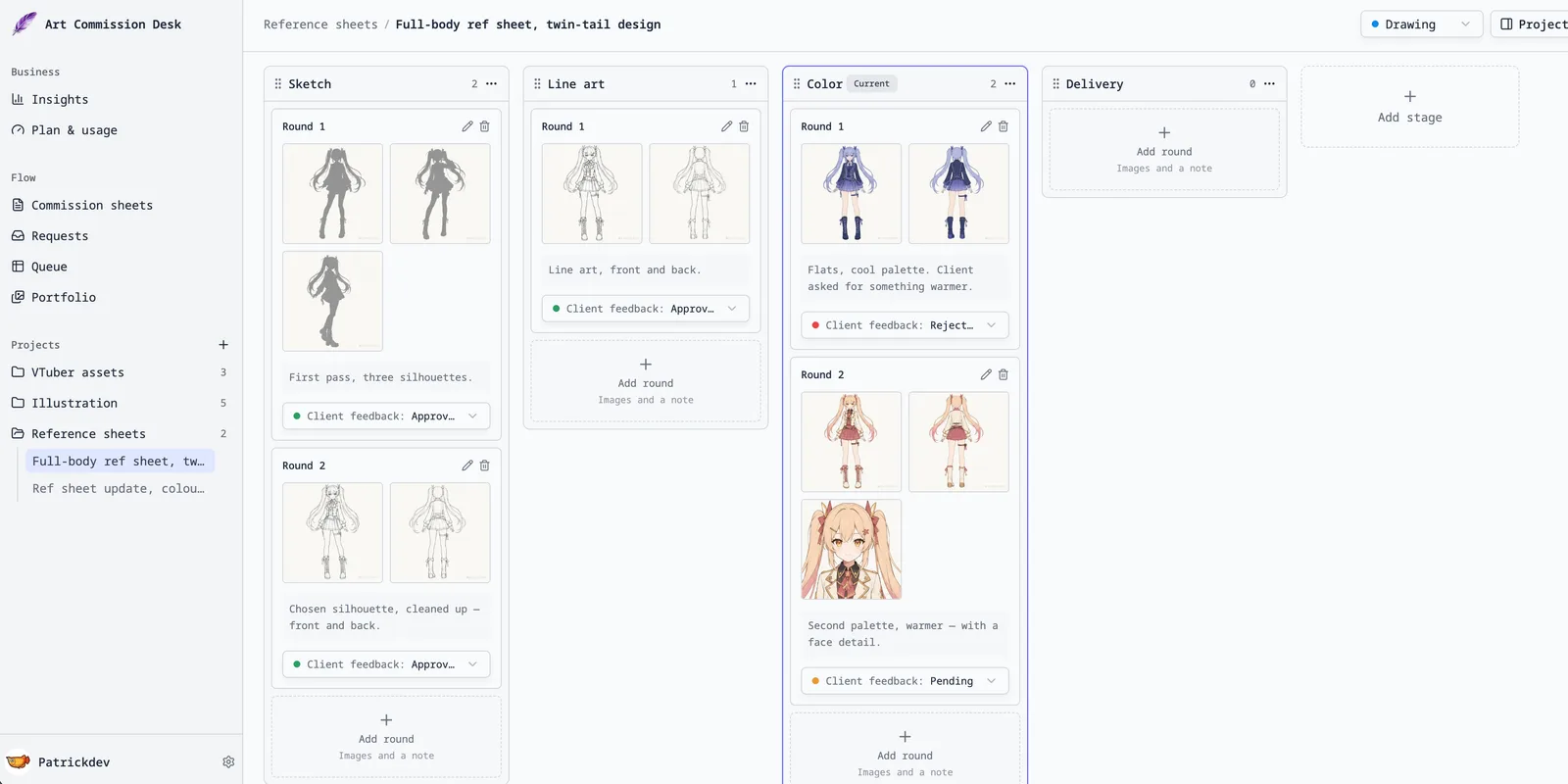
This is the thing our workspace is built around. You keep one board. Each project has its own visibility switch, and a public one gets a link that shows that piece — its stage, its rounds of work, the dates — and nothing about anyone else. There is no second board to update, because the client's page is a view of the same data you already changed. Public pages carry no controls at all; a visitor cannot approve, comment or move anything, because none of that exists there.
Two things to be aware of. Anything you type into a title or a client name field is on that page — we prompt about it where you type it, but the judgement is yours. And turning a project private takes effect immediately, though images already cached by a CDN can survive a few minutes.
Three things worth doing even if you change nothing
- Send the stage, not the status. "Lining now, colour next" tells a client more than "in progress", and takes the same five seconds.
- Give a queue position, not a date. Positions survive contact with reality; promised dates do not, and a missed one costs more trust than a long wait.
- Say when the next update will be, at the point of paying. Most "any update?" messages are the client checking whether they have been forgotten. One sentence at the start prevents weeks of them.
Related: what belongs on a commission sheet, and the tools people use to track a queue. We make one of the tools above; everything else here is meant to work regardless. If we have described someone's product wrongly, tell us and we will fix it.