
The best art commission sheet makers — and what actually belongs on one
August 14, 2026 · Art Commission Desk· Checked August 14, 2026
If you are making your first one, start in whatever you already know — Canva, Procreate, a Google Doc. The tool matters much less than the two things that decide whether the sheet works: nobody should have to do arithmetic to find their price, and you should be able to change a price without remaking the file.
Those two turn out to sort the options fairly cleanly, which is what the rest of this post is about.
What actually goes wrong with commission sheets
The complaints are remarkably consistent, and they are almost never about the art.
Here is a client-side reader on a sheet posted for feedback in r/AskArtists:
the sheet is too complicated, it's not difficult to understand but it takes a moment of reading to understand. perhaps think about simplifying it
And in the same thread, more specifically:
I would make the pricing of each option a bit more clear so the client doesn't have to calculate anything in their heads … you could maybe create separate commission sheets for each style
That second quote is the whole problem in one sentence. A sheet that lists a base price, then a per-character surcharge, then a background tier, then a rush fee, is asking a stranger to do mental maths before they know whether they can afford you. Most of them will not do the sum. They will assume it is expensive and close the tab, and you will never know it happened.
The same thread shows the author hitting it from the other side — halfway through the discussion they ask, about their own sheet, "so that makes the full render full body $80?". If the artist has to check, the client has no chance.
The other recurring failure is slower. A sheet made as a flat image is a file, and files go stale. You raise your prices, you close for the season, you stop taking one type of work — and the version pinned on your profile still says the old thing, because updating it means reopening the project file and re-exporting. The pinned image outlives the truth.
So what does a commission sheet need to do
Six things, all of them checkable — you can look at a sheet and say yes or no:
- One option, one total. The client reads a number, not a starting point plus modifiers.
- Editable in under five minutes. If a price change is a design task, it will not happen.
- Shareable as a link. Discord compresses images, Twitter crops them, and neither is readable on a phone. A link also lets you change what is behind it after you send it.
- Says what you will not draw. This is the single most common source of the awkward second message, and it costs one line.
- Carries your terms where the client will actually see them. Refunds especially — in a dispute the deciding factor is usually whether the terms were public before the work started, not what you said afterwards.
- Ends with a way to reach you. A beautiful sheet with no next step converts nobody.
Notice what is not on that list: fonts, layout, mockups. Those are what template marketplaces sell, and they are the part that matters least.
The seven ways people actually make them
Canva. Free, everyone can use it, and the result looks designed. It is genuinely the right answer for a first sheet. It fails criteria 1–3: it makes an image, so prices are typed by hand as flat text, edits mean re-exporting and re-uploading everywhere you posted it, and on Discord it arrives as a thumbnail someone has to click and pinch to read.
Photoshop / Procreate / Clip Studio. Same shape as Canva, worth it if the sheet doubles as a portfolio piece — same three failures.
Paid template files (Etsy, Gumroad). You are buying layout, not capability. They land as PSD or Canva files, so whatever the file format could not do before, it still cannot do. Fine as a shortcut past the design work; no help with the parts that break.
Toyhouse HTML codes. A real and underrated option inside that community: it is a link, it can be edited, and the code-sharing culture means there are good ones for free. The cost is that it lives on Toyhouse — you are asking clients from Twitter or Discord to land on a profile site they may not have an account for, and you inherit whatever that site does next.
Carrd or a one-page site. Link-shaped, editable in minutes, yours. This is the strongest of the general-purpose answers. What it does not do is know anything about commissions: pricing tiers are just text you typed, and there is no relationship between the sheet and the work that comes out of it.
Google Docs or Sheets. Free, instantly editable, and shareable as a link — it quietly satisfies criteria 2, 3 and 5. It fails on presentation in a way that matters more than it should: this is a first impression, and a shared spreadsheet reads as provisional. There is also a real hazard in sharing the wrong tab or the wrong permission, which is a bigger deal once the same file holds client names.
Marketplace listings (VGen, Artistree, Ko-fi). Structurally the best of the lot — options with real prices, a built-in order form, payment attached. Two costs. They take a cut of each commission, which is a straight trade you can evaluate. And they only work for clients who come through that platform: VGen in particular is invite-gated, so a client who found you on Twitter may not be able to use it, and you end up maintaining a second answer for everyone else.
Side by side
| One option, one total | Edit in 5 min | Shareable as link | Terms included | Order form | Cost | |
|---|---|---|---|---|---|---|
| Canva / Procreate | Typed by hand | No — re-export | Image only | Typed by hand | No | Free tier |
| Paid template files | Typed by hand | No — re-export | Image only | Typed by hand | No | One-off purchase |
| Toyhouse codes | Typed by hand | Yes | Yes | Typed by hand | No | Free |
| Carrd / one-pager | Typed by hand | Yes | Yes | Typed by hand | Add a form | Free tier |
| Google Docs | Typed by hand | Yes | Yes | Typed by hand | No | Free |
| VGen / Artistree / Ko-fi | Built in | Yes | Yes | Platform terms | Yes | Per-commission fee |
Prices are deliberately not in that table. Every platform in it has changed its pricing at least once, and a number typed here in 2026 would be quietly wrong by the time you read it. Check the current tiers yourself before you decide.
Where we come in
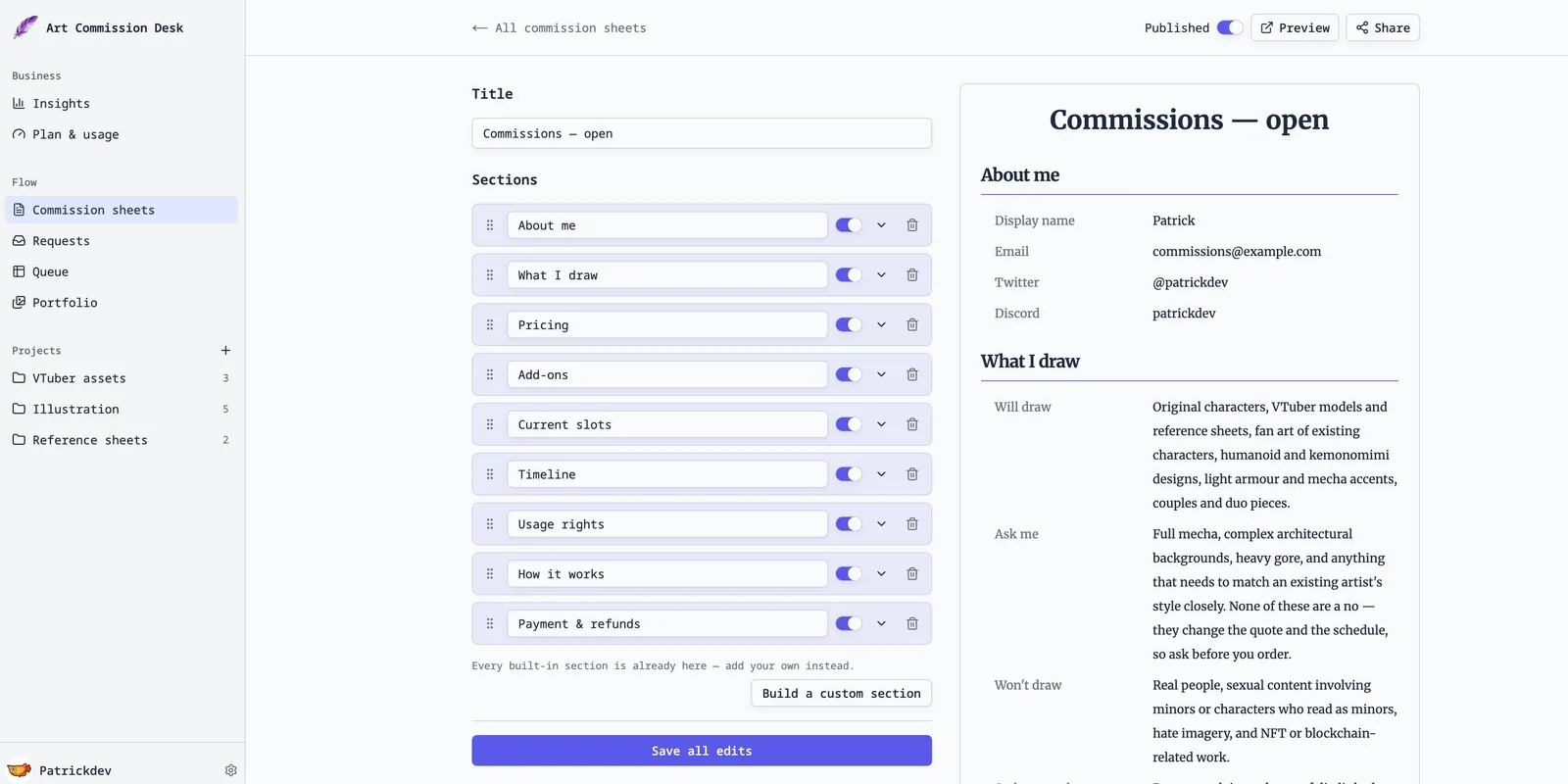
We build a workspace for commission artists, and its commission sheets are the link-shaped kind: sections for tiers, for what you will and won't draw, for usage and refund terms, for how many slots are open — each one editable on its own, published to one URL, with a request form at the bottom so a client who has read it can say what they want without leaving the page.
Two honest limits. It does not add up your options for you — a tier carries one price you wrote, and extras like a second character are listed separately, so the sheet is clear but the client still does the sum on a combined order. And it is one more account. If Carrd already works for you, Carrd already works.
If the account is what's holding you back, you can try the same editor without one: a free commission sheet generator that builds the same sections and exports straight to PDF — no sign-up, nothing saved on our end.
Three things worth doing whatever you use
- Split by style, not by everything. The advice in that thread — separate sheets per style — beats one sheet with a matrix of options. Two simple sheets convert better than one complete one.
- Put the total next to every option. Even where it means repeating yourself. "Full body, full render — $80" is a price. "Base $40, +$20 render, +$20 full body" is homework.
- Write the "I don't draw" line before you need it. One sentence, on the sheet, saves the conversation where you turn down a request you never wanted and feel bad about it.
Related: how artists show clients where a commission is, and the tools people use to track a commission queue. We make one of the tools mentioned above — everything here is meant to hold up whether or not you ever use it. If something looks wrong, tell us and we will fix it.